We recommend that you use the latest version of a modern web browser to ensure you are able to access all of the features and functionality of our website. Continuing to use your existing browser may not allow you to take advantage of certain features.
Your shopping cart includes at least one disqualified item that will not be kept and cannot be restored upon your next visit. Are you sure you want to proceed with logging out?
Hello Mobile User=Hello Mobile User!
Use our DESKTOP VERSIONand
GET 10% OFF up to $100
Use code: THX10
We are working to accommodate mobile orders very soon!
Knitted Cap - 100% Acrylic 68/32 Poly/Acrylic (Athletic Gray) 3" Folding Cuff One Size Fits Most Hand wash with like colors. Only non-chlorine bleach when needed. Dry flat, do not iron.
White Black Red Navy Athletic Gray Millennium Blue Olive Green Coyote Brown Brown
Embroidery Options:
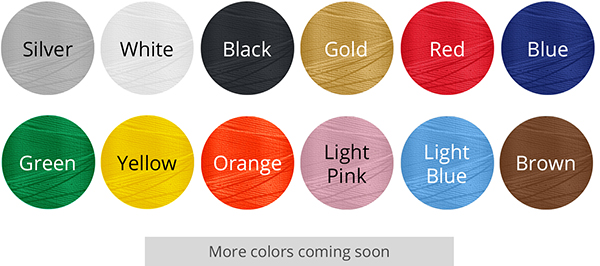
Thread Colors:
Flat Embroidery
White Black Silver Gold Red Blue Green Yellow Orange Light Pink Light Blue Brown
More Info:
Stay warm in the colder weather months with a custom beanie! Add a personalized touch to your winter accessories. An embroidered beanie is versatile as a gift for anyone on your list, from significant others to coworkers. Embroider a design, logo, or text with our selection of 12 vibrant thread colors. Simply upload your design file, select your thread colors (up to 12) on the other form, and provide any notes you'd want us to know in the text box field, like which thread color goes with which element in your design. We'll do the rest!
Artwork digitization is included in price
You can use as many as 12 thread colors per design.
In the text box, please specify which thread colors to use with which design elements. If your design includes a color we do not offer, we will substitute the closest thread color.
Flat embroidery means that your artwork will be stitched directly onto the fabric of the hat. This method is perfect for logos, text, and simple graphics.
The actual colors of the final product may vary from what is shown on your screen.
Maximum of 12 thread colors per design. We will match our thre
ad colors to your design as closely as possible.
Save your design file with a transparent background. If your file is saved with a white background, we may assume the white background is part of the design.
Artwork should be true to size - our downloadable templates can help you determine the correct size and placement of your design.
We do not accept pre-digitized files. All submitted designs must be digitized in-house (no additional charge).
Design Requirements:
Keep the design simple - avoid intricate details or fine lines.
Do not use photographic images or artwork with shadows/gradients.
Text should be at least 0.25 in height and at least 0.05 thick (at least 24 pt. font size, depending on the font).
Sans serif fonts like Helvetica and Futura work best for embroidery. Be careful when using script or decorative fonts, as the small details may get lo
st.
All text should be converted to outlines; otherwise, a different font may be substituted.
Note: Our maximum stitch count is 10,000 per design. If your designs stitch count will exceed this amount, we may contact you to revise the design.
For embroidered designs that pop, there should be some contrast between the color of your product and the color of your thread(s).
Recommended Artwork Dimensions: 4.5 (W) x 2.25'' (H)
Resolution
300 DPI
Color Mode
RGB
File Formats
TIF, TIFF, EPS, AI, PSD, BMP, GIF, JPG, PNG, PDF
Max File Upload Size
75MB
Manually Processed, PDF Proof
24 Hours (Excluding Weekends and Holidays). We will check your files and ensure they have the correct file specifications. If we find any problems with your files, we'll contact you, otherwise you'll receive a link to your PROOF to review within 1 business day.
If you have submitted a CD of your files, the proof turnaround will begin after we have received your CD. In addition, for all orders during the holiday season, we will be extending our proof turnaround time by 1 business day. Files not built correctly may delay the order.
To reduce file size, please upload in .jpg format. If you choose another file format, please ensure all layers are flattened. For best results, please use our downloadable templates below. All the available templates already have the correct dimensions, including bleed. For more information on bleed, color, file formats, file size, fonts, and resolution, please refer to our Preparing Files page.